> ## Documentation Index
> Fetch the complete documentation index at: https://docs.nexus-md.com/llms.txt
> Use this file to discover all available pages before exploring further.
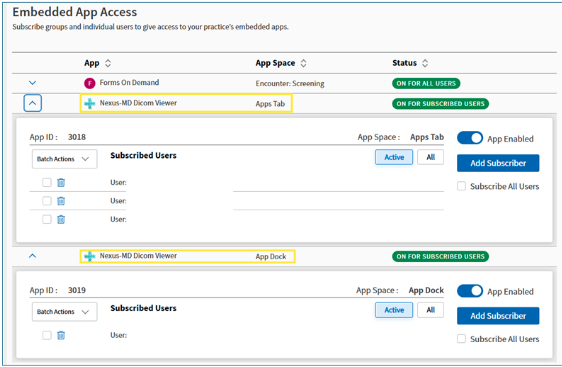
# Enabling Nexus-MD DICOM Viewer in AthenaOne
Here’s an [article](https://help.athenahealth.com/ohelp/Content/Chart%20Sections/C_Apps_S.htm) from the athena Success Community, and I have the steps listed below:
1. Go to settings > Practice Manager Admin
2. Click on “Embedded App User Subscriptions
3. Select the “Nexus-MD Dicom Viewer”, in the App Space, use the entry with “Apps Tab”
1. You can enable for all users or you can add specific subscribers or groups.
4. Select the “Nexus-MD Dicom Viewer”, in the App Space, use the entry with “Apps Dock”
1. You can enable for all users or you can add specific subscribers or groups.